
ABC of Development
So if you have been been around the computing science community you definitely have seen someone share a link to “GitHub”
But what is it? GitHub is basically a big website where everyone can share code. You can also have your own ‘repository‘ (your own space) but mostly it’s used to share code between developers.
So now that we know what is GitHub, your first question might be: “Is GitHub free?” Yes! It’s free and this is the beauty of GitHub,
developers and like-minded individuals share code together, and you can learn, copy or even help develop something!
Also the big benefit of GitHub is that you can store code or your own notes forever. (for now at least)
Another big advantage is that if you are looking for a specific code or program to do something for You, a quick simple Google search may surprise You!
As an example, as my first Python project I have made a screengrabber that screenshoted a users screen and shared it with friends on YouTube 🙂
Link: https://youtu.be/dNw5MWhQJh0
How To Use GH?
So, you can use GH for free, all you need to do is just register an account
Click here

Register an account & confirm your email, then go to the right corner, click on your profile and there should be an option “Repositories”
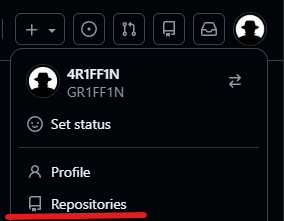
Click Repositories, in the right corner there should be a button “New”
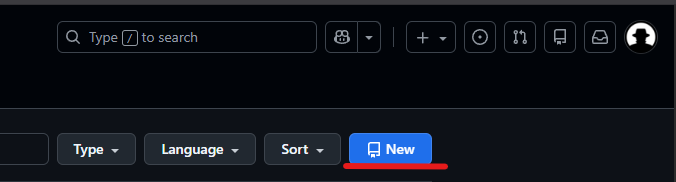
Click “New” add some general information, and then click “Create Repository”
After clicking on your Repository, you will most likely get a blank page, on the left there should be an option “Add File” -> “Create New File”
It should open up an editor, now in the name type “readme.md” and fill in some text
After that, just click “Commit Changes” and congratulations! You are now 1 step closer to being a professional developer!
So! Checkout GitHub & My GitBook and I hope you have a great day!